



Synoptic Weather API Frequently Asked Questions
Here are frequently asked questions regarding the Synoptic Weather API
The Weather API is request-based. You construct a URL using:
- A service endpoint (e.g., Time Series, Latest, Metadata, Precipitation)
- Required parameters (such as station and time range)
- Optional filters (variables, networks, geographic bounds, QC options)
- Your API token
Once submitted, the API returns structured JSON data by default.
Here is an API request with the above elements:
https://api.synopticdata.com/v2/stations/latest?stid=KSLC&token=YOUR_TOKEN
Synoptic has produced a video providing a general tutorial on Synoptic Weather API queries here.
We also have a query builder to learn how to construct queries here.
After logging into your Synoptic account or signing up for your account, navigate to your profile. Once on your “My Profile” page, go to the “Data Credentials” tab and go to the Private Key and Custom Tokens section which will display current tokens and keys as well as giving users the ability to create a key or token.
Your token must be included in all authenticated API requests. Keep it secure and do not expose it in public code repositories.
If you receive an authorization error, verify that:
- Your token is valid
- Your account has access to the requested API service
The Synoptic Weather API includes multiple services, including:
- Latest Observations – Returns the most recent observation from a station or set of stations
- Time Series – Historical observations over a time range
- Statistics: Returns minimum, maximum, mean (average) and counts for a defined time period with Synoptic basic and advanced quality control applied. Statistics are available for the entire period of record for all stations.
- Nearest Time – Returns the observation closest to the time requested
- Precipitation – Returns derived precipitation totals or intervals for a requested time period and set of stations. This service encompasses Synoptic’s Advanced Precipitation Service.
- Metadata: Returns metadata (information about stations) for a station or set of stations
- Percentiles – Return percentile distributions for air temp, wind speed or wind gust. Percentiles are available for various distributions (depending on variable) such as full period-of-record, daily minimum or maximum, or hourly. Percentile distributions are updated monthly, and have Synoptic basic and advanced quality control applied. For an in-depth explanation of our percentiles computation, refer to Statistics and Percentiles Services Explained.
Visit our documentation page to learn more about each service here.
The Synoptic Weather API produces data in the JSON format by default.
Weather API responses include the following:
- STATION – Array of station objects
- UNITS – Units for returned variables
- SUMMARY – Response status, message, and metadata
- QC_SUMMARY (if requested) – Quality control summary
Observation values are typically found under:
- OBSERVATIONS – Actual weather values
- SENSOR_VARIABLES – Sensor metadata and reporting history
All timestamps are returned in ISO 8601 format.
For more on JSON output format visit our documentation page here.
OBSERVATIONS is simply the element which holds variable data and time stamps.
SENSOR_VARIABLES provides a list of names of the variables returned from this station. This summarizes the variables which will be found in the OBSERVATIONS element.
You can select stations using a variety of parameters, including:
Station ID (stid), state, country, county, vars, network, radius, and much more. To get more information on station selection parameters, navigate to the Station Selection Parameters page in our documentation here.
You can also exclude values using ! before a parameter (example: exclude a specific station).
Multiple selection filters can be combined in a single request.
Heres an example excluding a station:
https://api.synopticdata.com/v2/stations/latest?stid=!KSLC&token=YOUR_TOKEN
Heres an example excluding multiple stations:
https://api.synopticdata.com/v2/stations/latest?stid=!KSLC,!KDEN&token=YOUR_TOKEN
Synoptic offers the following methods via our Station Selection Parameters:
Radius search – Return stations within a specified distance of a coordinate or station.
Bounding box (bbox) – Define a rectangular geographic region.
Here’s an example of a radius search query:
https://api.synopticdata.com/v2/stations/latest?radius=50,40.77,-111.85&vars=air_temp&token=YOUR_TOKEN
Here’s an example of a bbox (bounding box) query:
https://api.synopticdata.com/v2/stations/latest?bbox=-112,40,-111,41&vars=air_temp&token=YOUR_TOKEN
Use the vars parameter to request stations that report specific variables such as:
- air_temp
- wind_speed
- precipitation
By default, the API returns stations reporting any listed variable.
To require stations reporting all listed variables, use varsoperator=and.
Here’s an example query for filtering stations by variables:
https://api.synopticdata.com/v2/stations/latest?vars=air_temp,wind_speed&token=YOUR_TOKEN
The Precipitation Service provides accumulated rainfall totals. Output depends on the precipitation mode (pmode):
- Totals – Total accumulation over a specified time period
- Intervals – Accumulation broken into multiple time intervals
- Last – Accumulation over the most recent specified hours
Precipitation results include total amount, reporting timestamps, and observation counts.
Here are some example queries of precipitation:
Intervals mode:
https://api.synopticdata.com/v2/stations/precipitation?stid=KSLC&pmode=intervals&start=2026-02-01T00:00:00Z&end=2026-02-01T23:59:00Z&token=YOUR_TOKEN
Last mode example (accumulation for last 48 hours):
https://api.synopticdata.com/v2/stations/precipitation?stid=KSLC&pmode=last&accum_hours=48&token=YOUR_TOKEN
PERIOD_OF_RECORD defines the earliest and most recent observation timestamps available for:
- A station
- A specific sensor
It represents the full historical range of data available in the system from when the station was ingested into the Synoptic Platform.
Use Nearest Time with:
- ATTIME – The timestamp you are targeting
- WITHIN – The number of minutes allowed around that timestamp
The API returns the closest available observation within that window.
Here is an example of a query to fetch the nearest time within 15 minutes for station KSLC at 3:00pm UST:
https://api.synopticdata.com/v2/stations/nearest?stid=KSLC&ATTIME=2026-02-27T15:00:00Z&WITHIN=15&vars=air_temp&token=YOUR_TOKEN
Common response codes include:
- 1 – Success
- 2 – No results found
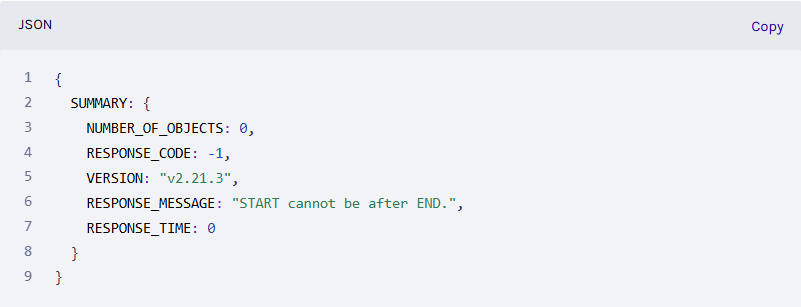
- -1 – Invalid parameter
- 403 – Authorization error
- 404 – Service endpoint not found
- 500 – Internal server error
Full details are provided in the SUMMARY object of each response.
When QC is enabled, the API provides the following information:
- QC checks applied
- Total flagged observations
- Percentage of flagged observations
- QC source and short names
For detailed time ranges of flagged data, use the QC Segments service. This allows you to see exactly when and which sensors were flagged.
All timestamps are returned in ISO 8601 format, including date, time, and time zone offset.
Time Series services return arrays of timestamps that align with arrays of observation values. These values can be returned in the local timezone of the observations by setting the obtimezone parameter as local.
Yes. Selection parameters support exclusion using the ! operator.
For example:
Exclude a station
The query below returns the latest temperature for stations in the ASOS network except KSLC:
https://api.synopticdata.com/v2/stations/latest?network=1&stid=!KSLC&vars=air_temp&token=YOUR_TOKEN
Exclude a state
The query below returns returns the latest temperature for stations in the ASOS network except those in Utah:
https://api.synopticdata.com/v2/stations/latest?network=1&state=!UT&vars=air_temp&token=YOUR_TOKEN
Exclude a network
This query returns the latest temperature for stations in Utah, but excludes all stations in the ASOS network:
https://api.synopticdata.com/v2/stations/latest?state=UT&network=!1&vars=air_temp&token=YOUR_TOKEN
This allows precise control over your dataset, and the data returned!
If an API response contains unexpected, missing, or incorrect values, work through the following:
- Check the QC_FLAGGED field in the response — a flagged value indicates a known quality control issue on that observation
- Use the Metadata endpoint to confirm the station is active: https://api.synopticdata.com/v2/stations/metadata?stid=YOUR_STID&token=YOUR_TOKEN
- Double-check your start, end, or recent time parameters — an incorrect range is a common cause of empty responses
- Verify that the variable you requested (e.g., vars=snow_depth) is reported by that station
If the issue persists after the above checks, submit a support ticket with the full API request URL, the station ID, the variable name, and the time range so our team can investigate.
The Push Streaming service delivers real-time weather observations to your application as data arrives, via WebSocket. This eliminates the need to poll the REST API and is designed for latency-sensitive use cases. To get started:
- Confirm your account plan includes Push Streaming — contact support if you are unsure
- Request streaming credentials via a support ticket
- Connect your client to the stream endpoint using a WebSocket library
For testing Push Streaming or discussing latency requirements and pricing, contact support directly.
Log into your Synoptic account, navigate to your profile, and open the “Data Credentials” tab. From there you can view, create, or revoke tokens and private keys. Your token must be included in all API requests.
To add or remove team members who need API access, submit a support ticket with the relevant email addresses. If your token is returning an authorization error, verify that:
- The token is copied correctly with no extra spaces
- Your account plan has access to the endpoint or dataset being requested
Ready to make smarter weather decisions?
For even more information on the Synoptic weather API please take a look at our documentation page located here!